
wat biz kecik2.hihi..
anything contact aku
ym - heary84
msn - flip2darkslide@hotmail.com
hp - 60125360189
gtalk - yesterdayrising
Showing posts with label design. Show all posts
Showing posts with label design. Show all posts
17 July 2008
design website
web 2.0
sedikit ringkasan mengenai web 2.0
Pernah dengar Web 2.0. Ia adalah trend terkini and masa depan untuk the world wide web. So what actually is Web 2.0?
Web 2.0 tekankan functionality and bina laman web yang fokus kepada kehendak pelawat. Commonly ia dipanggil “Central Design” yg mudahkannya untuk melihat dan memahami isi kandungan laman web 2.0.
Selain itu, Web 2.0 lebih canggih dari segi visibility aspek reba bentuk. Sini pengunaan text yang lebih besar, warna yang terang/cerah dan berkilat (atau bersilau) yang sememangnya senang di mata.
Berikut adalah contoh laman web 2.0:
Layout yang mudah atau “Central Layout"
Navigation yang mudah tetapi innovatif
Text yang lebih besar
Warna yang kuat dan cerah
Permukaan yang berkilat dan bersilauan
Icons

23 June 2008
blog editor
first time menulis blog.dunno ape yg perlu ditulis.
aku google kejap cari ape2 yg menarik utk blog neyh.
aku jumpe blog editor.aku da test satu daripada yg aku
jumpe ney.aku test BlogDesk.ok jugakla..senang sket offline
editing.nti just copy paste code jer.
kat cni ade lebey kurang 15 blog editor yg bule dicuba.
aku postkan beberapa yg menarik..
a) qumana blog editor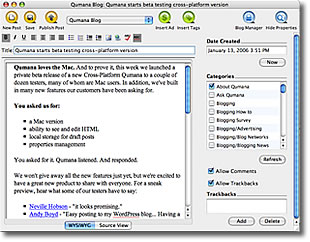
b) windows live writer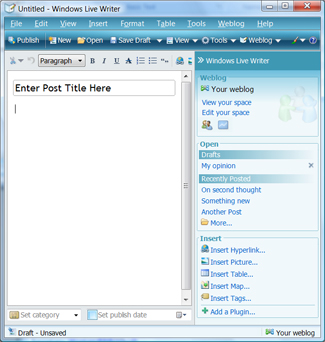
c)w.bloggar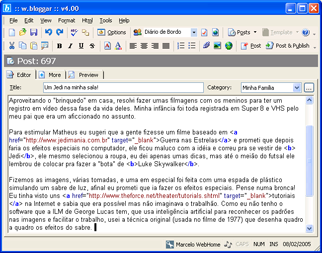
d) blogmate
e) blogdesk
f) bleezer
g) Post2Blog
Online dan browse based editor
utk online editor,bule jugak try WriteToMyBlog
p/s - more info bule klik cni
7 web design basic
The suggestions below are targeted at novice web designers and
people that can use some basic advice to get things going.
Tip 1 - Use a reference (but don't copy it!)
If you see an interesting web design, color scheme or layout,
try to use it as a starting point for your own web design.
Tip 2 - Be unique
Try to create a unique design. Do not overdone your web design
by adding numerous animated GIFs, fade-ins, etc.
Tip 3 - Content is king
Create content that purely relates to your website,
the more pages with useful content you have the better.
Make the body text on your index page focused and avoid
the need for the user to scroll down on any page.
Tip 4 - Graphical elements
Any Graphics that you use on the website should always
support the content and never dominate the content.
Tip 5 - Be HTML-compliant
Follow the proper HTML standards and check whether your
website is HTML-compliant, to make sure that your website
is displayed correctly in all browses.
Tip 6 - File size
Make sure that your site is quick to load in any browser.
There are obviously a number of factors that can affect
how quickly a website loads, but try to make sure that
large file sizes isn't one of them.
Tip 7 - Colorsheme
Use a colorscheme of matching colors.
Avoid excessive use of shouting colors such as green, yellow, or red.
p/s - aku pn still beginner lagi.kene byk belaja klau nk jd mantab!!
people that can use some basic advice to get things going.
Tip 1 - Use a reference (but don't copy it!)
If you see an interesting web design, color scheme or layout,
try to use it as a starting point for your own web design.
Tip 2 - Be unique
Try to create a unique design. Do not overdone your web design
by adding numerous animated GIFs, fade-ins, etc.
Tip 3 - Content is king
Create content that purely relates to your website,
the more pages with useful content you have the better.
Make the body text on your index page focused and avoid
the need for the user to scroll down on any page.
Tip 4 - Graphical elements
Any Graphics that you use on the website should always
support the content and never dominate the content.
Tip 5 - Be HTML-compliant
Follow the proper HTML standards and check whether your
website is HTML-compliant, to make sure that your website
is displayed correctly in all browses.
Tip 6 - File size
Make sure that your site is quick to load in any browser.
There are obviously a number of factors that can affect
how quickly a website loads, but try to make sure that
large file sizes isn't one of them.
Tip 7 - Colorsheme
Use a colorscheme of matching colors.
Avoid excessive use of shouting colors such as green, yellow, or red.
p/s - aku pn still beginner lagi.kene byk belaja klau nk jd mantab!!
Subscribe to:
Posts (Atom)